
Table of Contents
Overview
MLOps Context and the Need for Dedicated Model Serving
- In the modern era of artificial intelligence, the gap between a machine learning (ML) model that achieves high accuracy in the lab and an AI system that runs stably in production is enormous. This handover stage, commonly called "Model Serving" or "Inference Serving", poses serious technical challenges around latency, throughput, and scalability.
- NVIDIA Triton Inference Server (formerly TensorRT Inference Server) has emerged as an industry-standard solution to this problem. Triton is not merely a "web server" that hosts a model; it is a complex compute-management middleware that sits at the center of the AI pipeline.
- In a standard MLOps workflow:
- Data Engineering: Collect and process data.
- Model Training: Train models using frameworks such as PyTorch and TensorFlow.
- Model Optimization: Optimize the model (for example, quantization, pruning, conversion to TensorRT).
- Model Registry: Manage model versions.
- Model Serving (Triton's place): Deploy the model to serve predictions.
- Monitoring: Track performance and data drift.
Triton acts as a "high-performance bridge" at step 5. It takes trained models from steps 2 or 3, manages hardware resources (GPU/CPU) transparently, and exposes standardized API endpoints for client applications on the end-user side.
Comparative Analysis: Triton versus Alternative Solutions
An important architecture decision AI engineers often face is whether to build a server from scratch (Build) or adopt an existing solution (Buy/Adopt).
Triton versus Flask/FastAPI
Many teams start by wrapping a PyTorch/TensorFlow model in a Flask or FastAPI web application. Although this approach is easy to deploy at first, it shows critical weaknesses at scale:
- Low inference performance: Python web frameworks are constrained by the Global Interpreter Lock (GIL), which limits true multi-threading. When many requests arrive at once, they are often processed sequentially or with inefficient parallelism, so the GPU becomes bottlenecked on the CPU.
- Poor GPU memory management: Flask/FastAPI has no native mechanism for managing GPU memory. If multiple workers try to load the model onto the GPU at the same time, Out Of Memory (OOM) errors are very likely.
- Missing advanced features: Features such as Dynamic Batching (grouping requests dynamically) or Model Versioning must be implemented from scratch, which consumes time and easily introduces logic bugs.
Triton versus TorchServe and TensorFlow Serving
TorchServe and TensorFlow Serving are specialized serving solutions, but they are typically locked into their respective framework ecosystems.
| Characteristic | TensorFlow Serving | TorchServe | NVIDIA Triton Inference Server |
|---|---|---|---|
| Backend support | Optimized for TensorFlow (SavedModel). | Optimized for PyTorch (TorchScript/Eager). | Multi-framework: TensorRT, ONNX, PyTorch, TF, Python, OpenVINO, RAPIDS FIL. |
| GPU performance | Good on TF. | Good on PyTorch. | Excellent. Deeply optimized with CUDA/CUDNN libraries; memory managed directly in C++. |
| Pipeline/Ensemble | Limited. | Supported via workflows. | Powerful. Supports DAG (Directed Acyclic Graph) and Business Logic Scripting (BLS). |
| Batching mechanism | Yes. | Yes. | Dynamic Batching with Priority Queuing and timeout control. |
| Complexity | Medium. | Medium. | High (requires careful configuration, but in return you get full control). |
Why choose Triton? The most compelling reason is infrastructure unification. In an enterprise, data science teams may use many different frameworks. Instead of maintaining one server cluster for TorchServe and another for TF Serving, Triton lets you run every model type on the same instance, which optimizes hardware cost and simplifies the DevOps process.
Triton's Standout Features
- Multi-Framework Support: The ability to run models of different formats (ONNX, TensorRT, PyTorch) concurrently on the same GPU. Triton manages context switching efficiently to maximize GPU utilization.
- Dynamic Batching: This is the most important feature for increasing throughput. The server automatically groups sparse requests from many clients into a large batch to send to the GPU. Matrix computation on a large batch is much more efficient than computing one request at a time.
- Concurrent Model Execution: Triton allows multiple instances of the same model (or different models) to run in parallel on the same GPU (using CUDA Streams) or to be load-balanced across multiple GPUs.
- Model Ensembles & BLS: Support for building complex pipelines (preprocessing → inference → postprocessing) on the server itself, reducing data transfer between client and server (network overhead).
Communication Protocols: HTTP vs. gRPC
Triton supports the KServe standard for both protocols.
- HTTP/REST (Port 8000):
- Characteristics: Uses a JSON payload. Easy to integrate with Web/JS applications. Easy to debug with tools such as cURL or Postman.
- Limitations: Lower performance due to JSON serialization/deserialization overhead, and it does not support persistent connections as efficiently as gRPC.
- Recommended for: Applications that do not require extremely low latency, or for development/testing.
- gRPC (Port 8001):
- Characteristics: Uses Protocol Buffers (binary format). Supports bidirectional streaming, keeps a persistent connection, and compresses data efficiently.
- Advantages: Low latency, high bandwidth. Guarantees packet order (important for stateful models such as Speech-to-Text).
- Recommended for: Production environments, communication between microservices, or when the input is large data (high-resolution images, video, audio).
Architecture overview
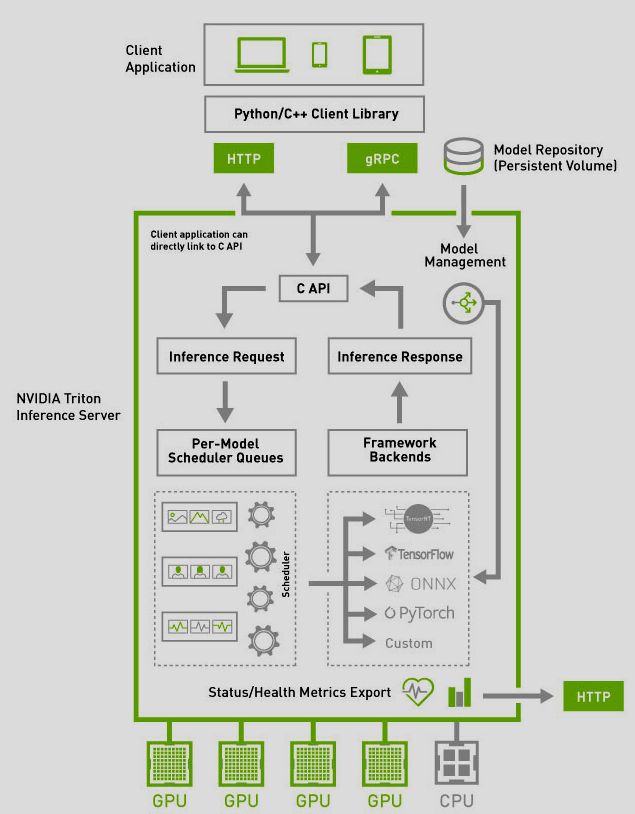
Triton Inference Server runs as a standalone service. Client requests are sent here to perform inference. It is responsible for managing models, handling inference requests from clients, and returning results with the best possible performance. When a request arrives, TIS selects the appropriate model, processes the input data, and returns the corresponding result. TIS is optimized by NVIDIA's team to run best on NVIDIA GPUs. Triton Inference Server has the following main components:
- Model Repository: This is the directory that stores models configured so Triton can manage them and load them into memory when needed. The Model Repository includes model versions and configuration files (config.pbtxt) that describe how the model is run, how input/output is handled, and resource requirements.
- Scheduler: This component manages requests sent to Triton. The Scheduler optimizes resource usage by grouping requests into batches and adjusting processing time to minimize latency. This ensures the system can handle many requests at once without becoming overloaded.
- Model Execution Backend: TIS supports many backends to perform inference, including TensorFlow, PyTorch, ONNX Runtime, TensorRT, and others. Each backend processes models according to the corresponding format and framework, ensuring compatibility and the highest performance.
- Inference API: TIS provides two main API types, REST and gRPC, so users can send inference requests remotely and receive results over the network. These APIs support a wide range of request types, from single requests to batch processing, suitable for large-scale applications.
When a request is sent to Triton Inference Server, it goes through the following steps:
- Step 1 Receive the request from the API: The user sends a request through the REST or gRPC API, together with input data for the model.
- Step 2 Select the model and version: Triton selects the appropriate model based on the request and checks the active version in the Model Repository
- Step 3 Optimize with Batching: If there are many similar requests, Triton groups them into a batch to process at the same time, reducing system load and increasing processing speed.
- Step 4 Execute the model: The model execution backend receives the data batch, performs inference, and returns results based on the input data.
- Step 5 Return the result to the client: After inference completes, TIS returns the result to the user through the API.
Model repository
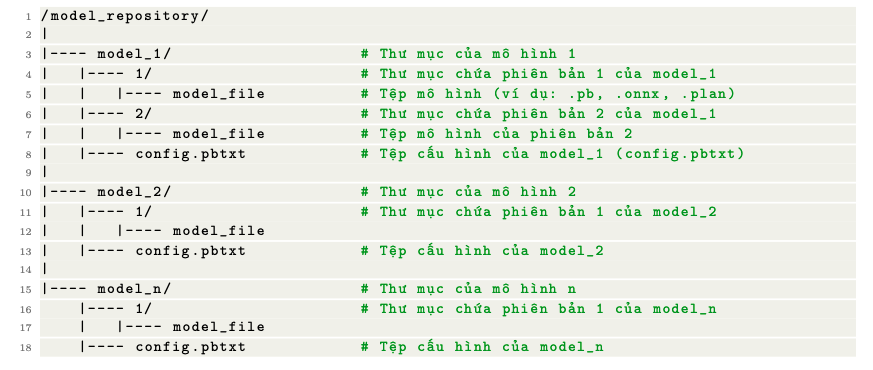
Every model used on Triton Inference Server is configured and organized in the Model Repository. This is where models and their configuration information are stored. For example, if you have a model.onnx file, you need a corresponding configuration to run it on TIS. You need to do the following:
- Create a dedicated directory for the model: Each model must live in its own directory. That directory must contain at least one primary model file, model.onnx, and a configuration file, config.pbtxt. This configuration file must define important parameters such as the model's input/output, maximum batch size, and the maximum number of concurrent requests the model can handle. The directory tree looks like this:
- Configure config.pbtxt: This is a protobuf file that describes how the model will be executed in TIS. It includes information about input/output data formats, batching, dynamic batching, and other performance parameters. An example configuration file is shown below:
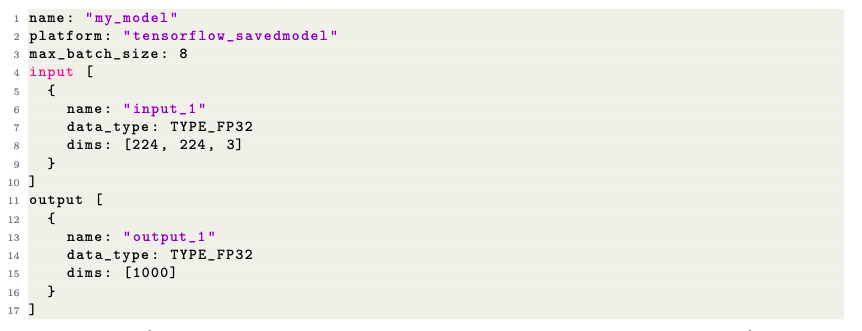
This is a Protobuf Text format file that serves as Triton's blueprint. It answers questions such as: What is the input shape? Is the datatype FP32 or INT8? Should it run on CPU or GPU? Which backend should be used? Without this file, Triton has a Strict-Model-Config=False mode that infers the configuration automatically, but in production, an explicit definition is required to control performance
- After that, when deploying Triton Inference Server, you must declare the correct directory location. TIS will automatically load the model and initialize the inference process as defined in config.pbtxt.
Instance Groups
An Instance Group is the concept that lets Triton replicate a model in memory so it can handle many requests concurrently.
- Parallel Execution on GPU: By default, Triton creates 1 instance per GPU. However, if the model is lightweight (for example ResNet18) and the GPU is powerful (A100), a single instance cannot utilize 100% of the CUDA Cores. By increasing
count, you create multiple copies of the model. These copies share memory (weights) but have separate execution contexts, allowing the GPU to overlap computation and data transfer.
instance_group [
  {
    count: 2
    kind: KIND_GPU
    gpus: [ 0, 1 ]
  }
]
Below is an illustration of using Dynamic Batching and Concurrent model execution
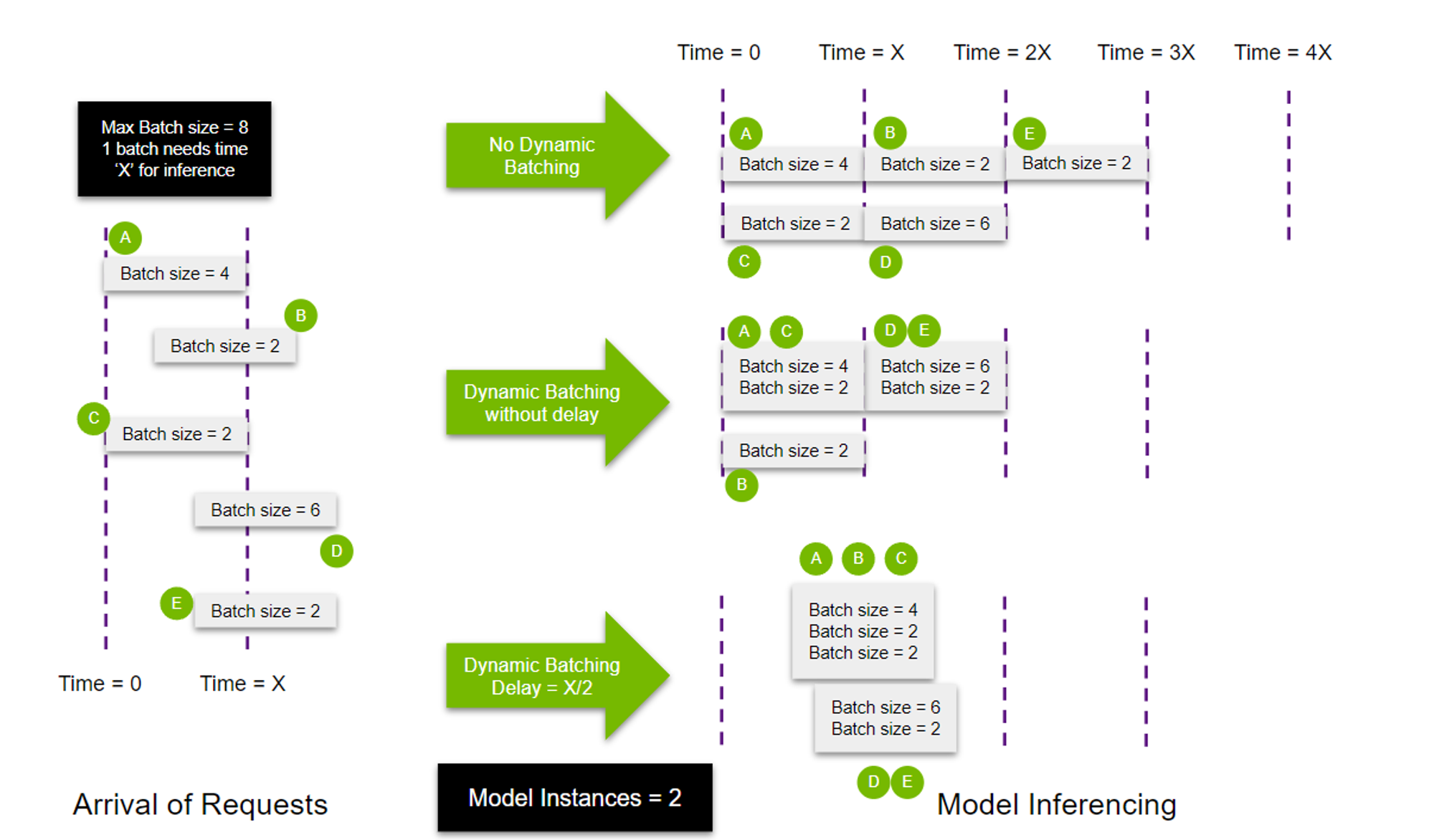
- In the figure above, the number of model instances used is 2. Therefore, instead of one model processing all 5 queries, 2 models are created.
- In the No Dynamic Batching case, because 2 models are executing, queries are distributed evenly. Model 1 processes request A and the other model processes request C because both requests were sent at the same time. After finishing A and C, the 2 models continue to receive requests B and D in the order they appear. After model 1 finishes request B, model 1 continues to receive request E for processing.
- In the Dynamic Batching without delay case, Max batch size is initialized = 8. Therefore, model 1 executes both requests that arrive at the same time, A and C. Then, request B, which arrives with a certain delay, can be executed using the second model.
- In the case with Delay, model 1 is filled and launched at time T = X/2. Queries D and E stack together to fill the maximum batch size (initialized = 8), so the second model can start executing without any delay.
- CPU Execution: Triton allows you to specify
kind: KIND_CPUto run the model on CPU. This is useful for logic models (Python backend) or traditional ML models (XGBoost, Scikit-learn) that do not benefit much from a GPU.
Common backends
Triton Inference Server supports many backends for running inference on models built with well-known libraries and platforms. Below are some popular backends supported by TIS:
- PyTorch Backend: Supports models converted to TorchScript format and is used by declaring the platform variable in config.pbtxt as pytorch_libtorch.
- ONNX Runtime Backend: Supports models converted to ONNX format and is used by declaring the platform variable in config.pbtxt as onnxruntime_onnx.
- Python Backend: Supports inference workflows for models that do not follow a standard format, or that need Python tasks before and after inference. Used by declaring the platform variable in config.pbtxt as python.
- OpenVINO Backend: Supports models optimized for Intel hardware through the OpenVINO platform. The model format typically includes .xml and .bin files. Used by declaring the platform variable in config.pbtxt as openvino.
- TensorRT Backend: Supports models optimized for NVIDIA GPUs through TensorRT. Used by declaring the platform variable in config.pbtxt as tensorrt_plan.
- TensorFlow Backend: Supports TensorFlow models in SavedModel or GraphDef format. To use it, declare the platform variable in config.pbtxt as tensorflow_savedmodel or tensorflow_graphdef depending on the model format.
Example of using the Python backend
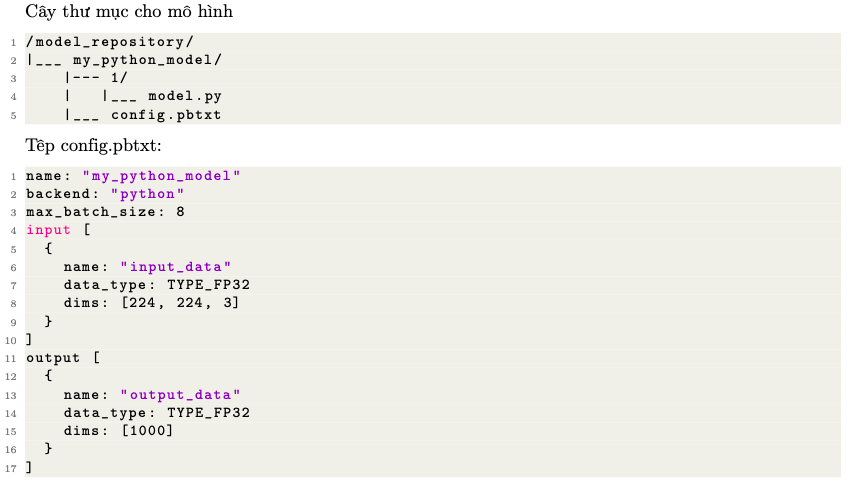
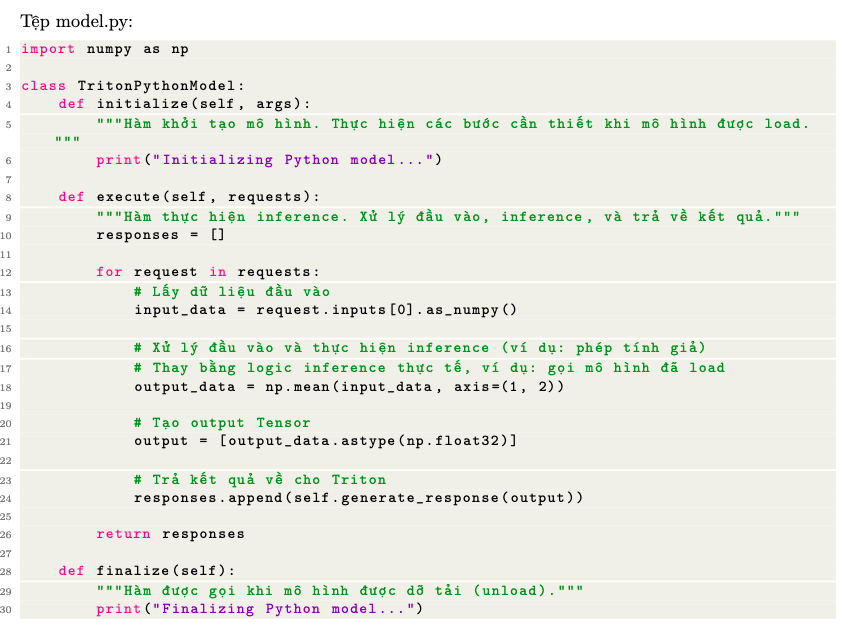
The functions have the following meaning:
- initialize: Initializes the model when Triton loads it. Can be used to load the model or other required resources.
- execute: Performs inference when a request arrives from the client. In this example, an average is computed over the input data to simulate model processing (real inference could call TensorFlow, PyTorch, or any other library).
- finalize: Called when Triton unloads the model, typically to release resources or perform cleanup.
Advanced features
Below are some advanced features of Triton Inference Server that can be used to optimize inference performance:
Dynamic Batching
- This feature automatically combines multiple inference requests into one large batch so they can be processed together. This increases throughput and optimizes hardware resource usage, especially GPU. Triton Inference Server waits a short time to gather inference requests into a batch. As a result, TIS can reduce the processing latency of requests without affecting response time much.
- Trade-off: Throughput increases, but the latency of each individual request increases by the wait time. This technique is most effective for models with high compute cost (compute-bound).
To use Dynamic Batching, configure it in config.pbtxt as follows:
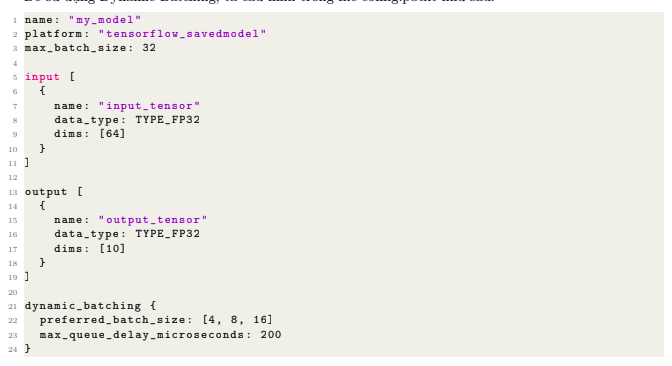
In this configuration:
- max_batch_size is 32, which limits the maximum batch size the model can process
- preferred_batch_size prefers grouping requests into batches of size 4, 8, or 16.
- max_queue_delay_microseconds is 200 microseconds, meaning Triton will wait at most 200 microseconds before processing the current batch.
Scheduling & Queuing
Triton uses different scheduling strategies depending on the model type:
- Default Scheduler: Used for stateless models (Classification, Detection). Distributes requests to any idle instance.
- Ensemble Scheduler: Manages data flow between models in a pipeline without returning to the client.
- Sequence Batcher: Used for stateful models (Chatbot, Voice Rec). Ensures that requests with the same
sequence_idandcorrelation_idare routed to the same instance in chronological order. It also manages the "start" and "end" of a conversation sequence.
Model Ensembles: Unified Pipeline
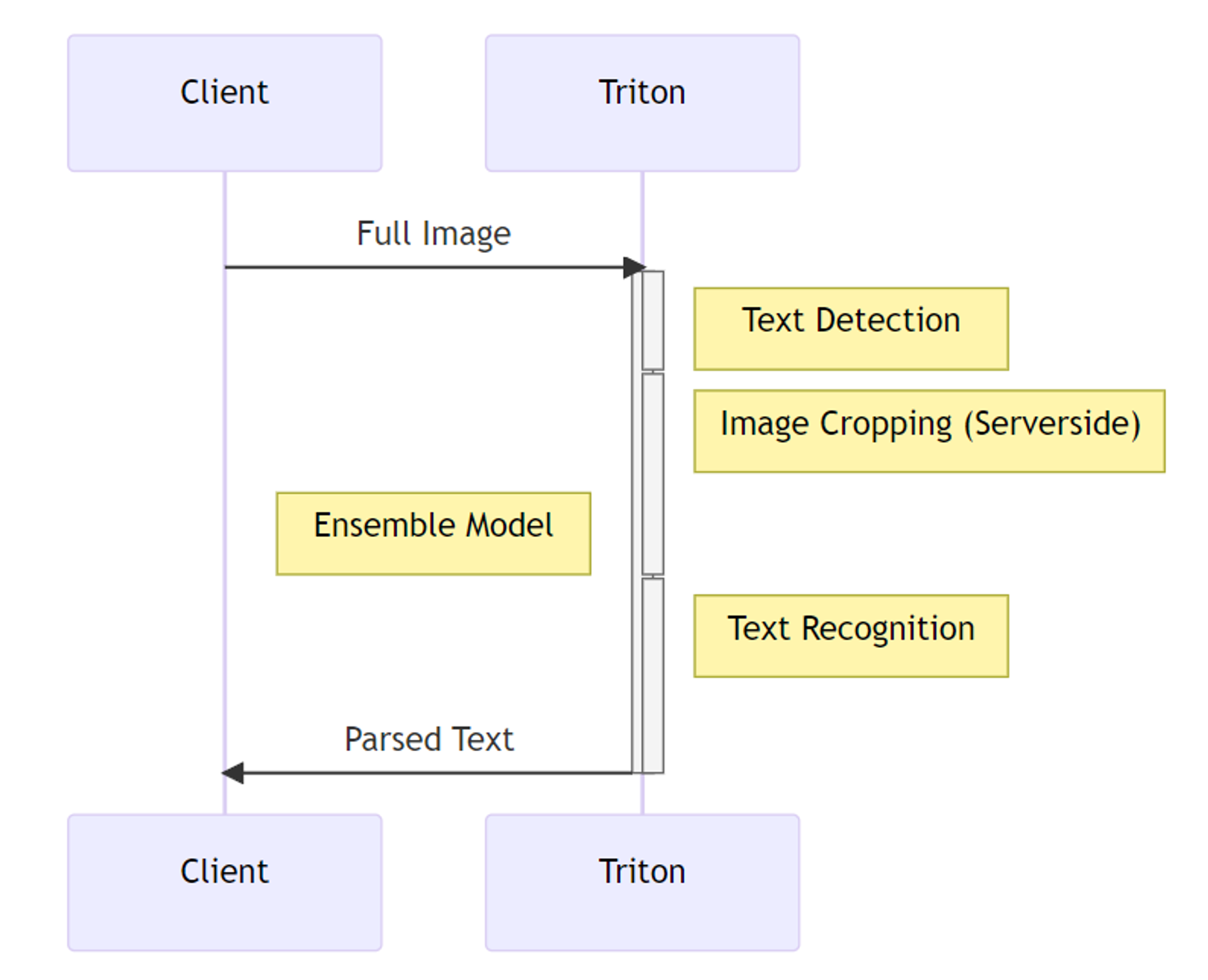
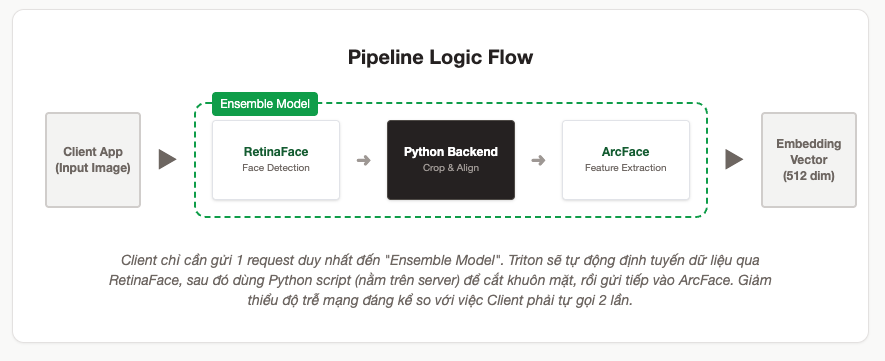
- A pipeline built from multiple models can connect input and output tensors between models and share the GPU to optimize performance. Ensemble models are intended to package a process that involves multiple models, such as data preprocessing → inference → data postprocessing. Using ensemble models can avoid the cost of transferring intermediate tensors and reduce the number of requests that must be sent to Triton.
- Ensemble lets you combine Preprocessing steps (often written in Python or DALI) and Inference (TensorRT/ONNX) into a DAG.
- Benefit: Eliminates network transfer overhead. For example: the Client sends a compressed JPEG image (100KB). If preprocessing is done on the Client, the Client must send a Float32 tensor (3x224x224 ~ 600KB). With Ensemble, the Client sends JPEG (100KB) → the Server decompresses and converts it → TensorRT processes it. That saves 6 times the network bandwidth.
- Structure: An Ensemble model has no actual weight file; it only has a
config.pbtxtthat defines the data flow (Step 1 output → Step 2 input).
Ragged Batching
This feature allows inference requests of uneven size to be processed in the same batch without the user adding padding. It is especially useful in inference workflows for NLP or time-series models. By supporting inputs of different sizes, Ragged Batching can be combined with Dynamic Batching to optimize performance, reduce unnecessary memory usage, and improve throughput while keeping high flexibility when processing requests.
To use Ragged Batching, configure config.pbtxt as follows:
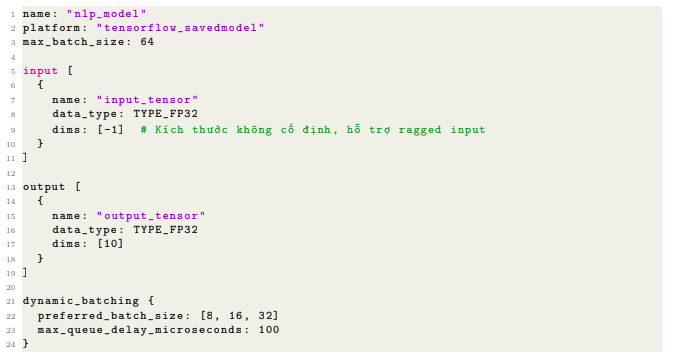
Where:
- dims: [-1] allows the input to have a non-fixed size, supporting batches of data with different sizes.
Model Warmup
When a model is loaded and initialized on TIS with the corresponding backend, some backends may delay completing initialization until they receive real requests. This can make the first requests much slower. Model Warmup solves this by automatically sending some requests to the corresponding model in advance to trigger the full initialization process.
To use Model Warmup, configure config.pbtxt as follows:
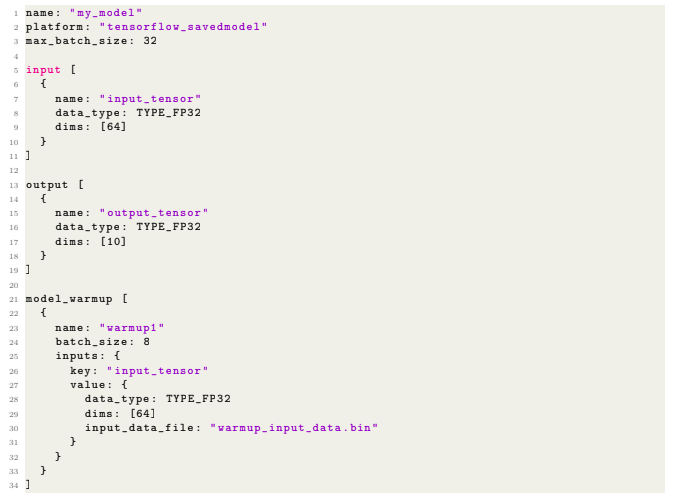
Where:
- model_warmup: The configuration block for the warmup process. Here there is one warmup step named warmup1.
- batch_size: The batch size for the warmup request is 8.
- input_data_file: Input data for the warmup request is provided via the file warmup_input_data.bin.
Response Cache
Similar to caching in traditional software, Response Cache lets you store and reuse results of inference requests that were processed earlier, reducing latency and increasing inference system performance. By storing request results, the system can return results from cache without running the full inference process on the model again. This is especially useful in systems with many repeated requests.
To use Response Cache, configure config.pbtxt as follows
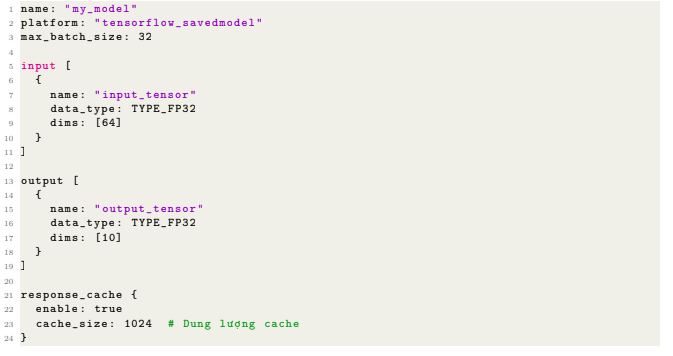
Best Practices and Production Optimization
Getting a model to run is only the first step. Optimizing it to handle high load stably is what determines whether an MLOps project succeeds.
Triton Performance Analyzer (perf_analyzer)
- Used to benchmark a model running in Triton Server:
- latency (p50, p90, p95, p99)
- throughput (infer/sec)
- GPU utilization
- request concurrency
- server queue time
- batch size performance
Create a YAML file
version: 1
model_repository: /models
output_model_repository_path: /results

profile_models:
  arcface_tensorrt:
    parameters:
      batch_sizes: [1, 4, 8, 16]
      concurrency: [1, 2, 4, 8]
Run the analyzer
model-analyzer analyze -f config.yaml
Two types of reports are generated
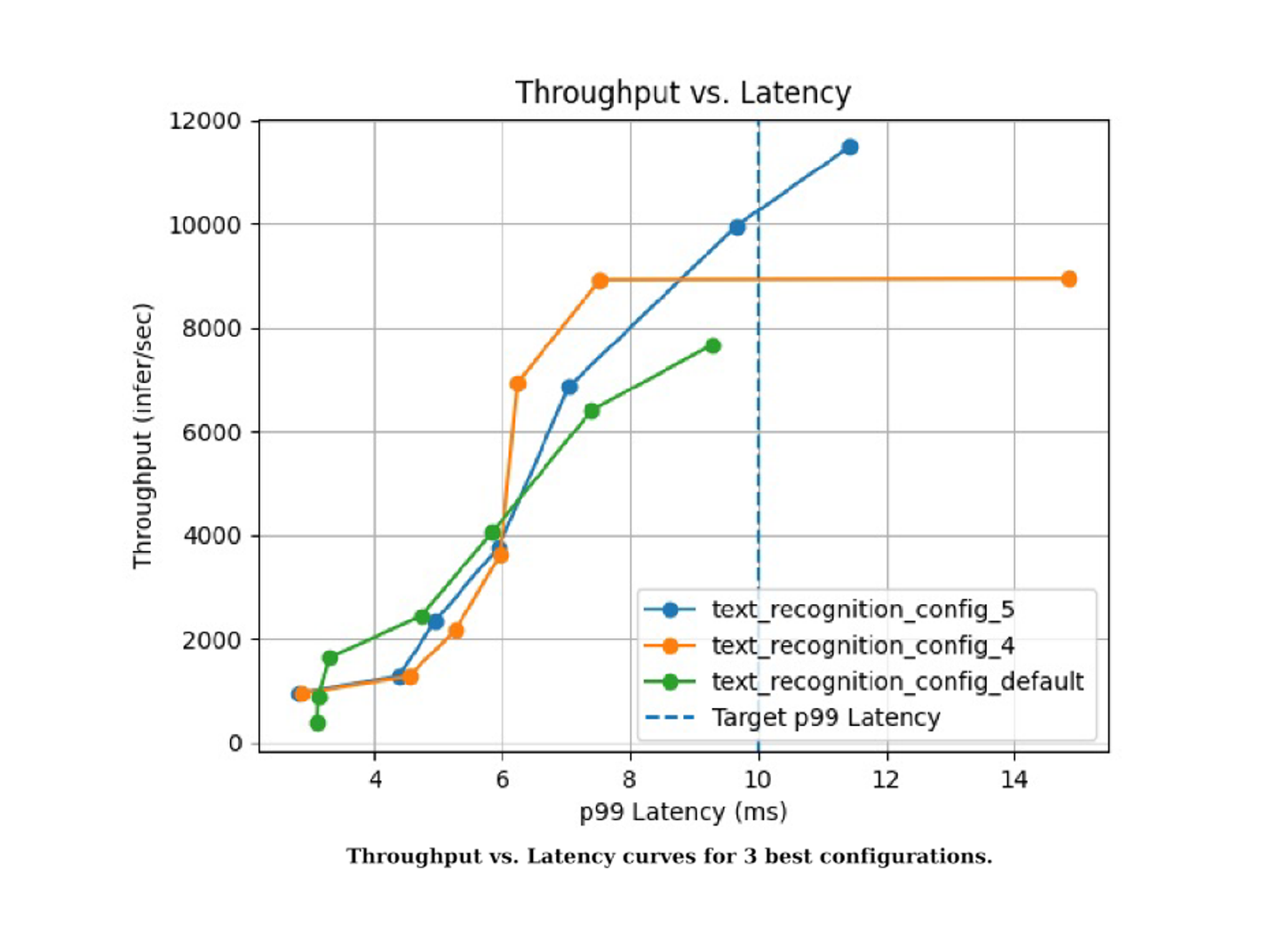
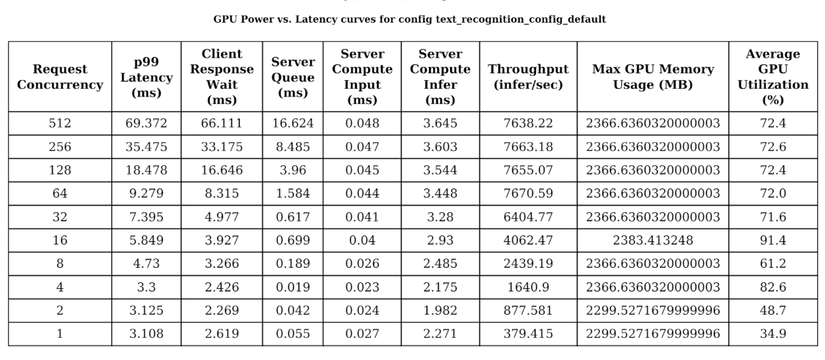
Performance Tuning with Model Analyzer
Do not guess configuration parameters (max_batch_size, instance_count). NVIDIA provides Model Analyzer to automatically find the sweet spot.
Model Analyzer performs an "intelligent brute-force" process:
- Automatically change the configuration (for example: try batch sizes from 1 to 128, try 1 to 4 instances).
- Run a simulated load benchmark (using Perf Analyzer underneath).
- Measure Latency and Throughput.
- Propose the best
config.pbtxtbased on the objective (for example: Latency < 10ms).
Example command:
model-analyzer profile -m resnet50 --profile-models resnet50 --output-model-repository-path output_repo
Framework Optimization (TensorRT & ONNX Runtime)
- Convert to TensorRT: This is the most effective optimization method on NVIDIA GPUs. TensorRT performs "Kernel Fusion" (merging network layers to reduce memory access) and supports low-precision computation (FP16/INT8). Converting from PyTorch to TensorRT (
.plan) often yields a 2x to 6x speedup. - ONNX Runtime: If the model has complex operators that TensorRT does not yet support, ONNX Runtime is a good alternative with higher performance than native PyTorch and broad compatibility.
Metrics & Monitoring (Prometheus & Grafana)
In production, observability is mandatory. Triton ships with a metrics endpoint on port 8002.
Prometheus configuration (prometheus.yml):
scrape_configs:
  - job_name: 'triton'
    static_configs:
      - targets: ['triton-server:8002']
Important metrics to monitor on Grafana:
nv_inference_request_success: Number of successful requests (Throughput).nv_inference_queue_duration_us: Time a request spends waiting in the queue (shows whether Dynamic Batching is working actively or causing delay).nv_inference_compute_infer_duration_us: Actual GPU compute time.nv_gpu_utilization: GPU utilization level.
Memory Management (Avoiding OOM)
When hosting many models on one GPU, OOM is a major risk. Solutions include:
- Rate Limiting: Use Triton's
Rate Limiterfeature to limit how many concurrent requests are pushed into execution. - Explicit Model Loading: Set
-model-control-mode=explicit. Instead of loading every model at startup (which can cause OOM immediately), Triton loads a model only when the management API is called. This enables a dynamic Load/Unload strategy.-
Model Control Modes:
Triton provides model management APIs as part of the HTTP/REST and gRPC protocols, and as part of the C API. Triton operates in one of 3 model control modes: NONE, EXPLICIT, or POLL. The model control mode determines how Triton handles changes to the model repository and which protocols or APIs are available:
- NONE: Triton tries to load all models in the model repository at startup. Models that cannot be loaded are marked UNAVAILABLE and will not be available for inferencing. Any changes to the model repository while the server is running are ignored. Model load and unload requests using the model control protocol have no effect and return an error response. When starting Triton, specify
-model-control-mode=none(default). - EXPLICIT: At startup, Triton only loads models that are explicitly specified via the command-line
-load-model. After startup, every model load or unload must be initiated explicitly using the model control protocol. Specifymodel-control-mode=explicit. - POLL: Triton tries to load all models in the model repository at startup. Changes to the model repository are detected and Triton tries to load and unload models as needed based on those changes. Model load and unload requests using the model control protocol have no effect and return an error response. Specify
model-control-mode=poll.
- NONE: Triton tries to load all models in the model repository at startup. Models that cannot be loaded are marked UNAVAILABLE and will not be available for inferencing. Any changes to the model repository while the server is running are ignored. Model load and unload requests using the model control protocol have no effect and return an error response. When starting Triton, specify
-
- Unified Memory (TensorRT): When building a TensorRT engine, you can allow system RAM to be used as a buffer when VRAM is full, accepting lower performance to avoid a crash.
Case Study: Face Recognition System (Face Recognition Pipeline)
Environment Setup with Docker
First, install Docker and the NVIDIA Container Toolkit. Then pull the Triton Server image.
# Pull the Triton Server image (contains PyTorch, TensorFlow, ONNX backends...)
# Choose version xx.yy that matches your NVIDIA driver (for example: 23.10)
docker pull nvcr.io/nvidia/tritonserver:23.10-py3

# Pull the SDK image (contains client libraries and sample tools)
docker pull nvcr.io/nvidia/tritonserver:23.10-py3-sdk
This section applies all of the knowledge to a complex scenario: a real-time face recognition pipeline.
System requirements:
- Face Detection: RetinaFace model (Input: original image → Output: N Bounding Boxes).
- Processing Logic: Crop and align faces based on Bounding Boxes. The number of faces N is dynamic (0, 1, or many faces).
- Feature Extraction: ArcFace model (Input: batch of N 112x112 face images → Output: N 512-dimensional feature vectors).
Challenge: Triton's traditional Ensemble model (DAG) is linear and static. It does not support loops or conditionals to handle a dynamic number of faces N that varies per image.
Solution: Use Business Logic Scripting (BLS) through the Python Backend as the orchestrator. The Python Backend receives the request, calls RetinaFace, handles crop logic with NumPy/OpenCV, then calls ArcFace.
Data Flow Design (Pipeline Architecture)
The system consists of 4 models in model_repository:
| Stage | Responsibility |
|---|---|
| RetinaFace | Detect bounding boxes + landmarks |
| Python Backend | Orchestrator: resize → call inference → crop → align → batching |
| ArcFace | Compute a 512-d embedding for each face |
| Client | Send an image → receive a list of embeddings |
Execution flow:
Client sends Image → face_pipeline (Python) → pb_utils.InferenceRequest → retinaface_tensorrt → Returns Boxes → Python code crops the image → pb_utils.InferenceRequest → arcface_tensorrt (Batch N) → Returns Embeddings → Client.
model_repository directory structure
model_repository/
│
├── retinaface_tensorrt/
│   ├── 1/
│   │   └── model.plan
│   └── config.pbtxt
│
├── arcface_tensorrt/
│   ├── 1/
│   │   └── model.plan
│   └── config.pbtxt
│
└── face_pipeline/
    ├── 1/
    │   └── model.py
    └── config.pbtxt
Setting up retinaface_tensorrt
config.pbtxt file
name: "retinaface_tensorrt"
backend: "tensorrt"
max_batch_size: 1

input [
  {
    name: "input"
    data_type: TYPE_FP32
    dims: [3, 640, 640]
  }
]

output [
  {
    name: "bboxes"
    data_type: TYPE_FP32
    dims: [-1, 4]      # N x 4
  },
  {
    name: "landmarks"
    data_type: TYPE_FP32
    dims: [-1, 10]     # N x 5 landmarks
  },
  {
    name: "scores"
    data_type: TYPE_FP32
    dims: [-1]
  }
]
Setting up arcface_tensorrt
config.pbtxt file
name: "arcface_tensorrt"
backend: "tensorrt"

max_batch_size: 64

input [
  {
    name: "input"
    data_type: TYPE_FP32
    dims: [3, 112, 112]
  }
]

output [
  {
    name: "embedding"
    data_type: TYPE_FP32
    dims: [512]
  }
]
Setting up face_pipeline (Python Backend + Orchestrator)
config.pbtxt file
name: "face_pipeline"
backend: "python"
max_batch_size: 1

input [
  {
    name: "input_image"
    data_type: TYPE_UINT8
    dims: [-1]   # raw bytes
  }
]

output [
  {
    name: "face_count"
    data_type: TYPE_INT32
    dims: [1]
  },
  {
    name: "embeddings"
    data_type: TYPE_FP32
    dims: [-1, 512]  # N x 512
  }
]
model.py file
import numpy as np
import triton_python_backend_utils as pb_utils
import cv2
import io

class TritonPythonModel:

    def initialize(self, args):
        self.model_name = args["model_name"]

    def execute(self, requests):
        responses = []

        for request in requests:
            # -------------------------
            # 1. Get the image from the client
            # -------------------------
            image_bytes = pb_utils.get_input_tensor_by_name(
                request, "input_image"
            ).as_numpy().tobytes()

            img_array = np.frombuffer(image_bytes, dtype=np.uint8)
            img = cv2.imdecode(img_array, cv2.IMREAD_COLOR)
            h, w = img.shape[:2]

            # Resize input for RetinaFace (depends on the model)
            img_resized = cv2.resize(img, (640, 640))
            img_input = img_resized.transpose(2, 0, 1).astype(np.float32)

            # -------------------------
            # 2. Call the RetinaFace model
            # -------------------------
            retina_req = pb_utils.InferenceRequest(
                model_name="retinaface_tensorrt",
                requested_output_names=["bboxes", "landmarks", "scores"],
                inputs=[
                    pb_utils.Tensor.from_numpy("input", img_input[np.newaxis, ...])
                ]
            )

            retina_res = retina_req.exec()

            bboxes = pb_utils.get_output_tensor_by_name(
                retina_res, "bboxes"
            ).as_numpy()

            landmarks = pb_utils.get_output_tensor_by_name(
                retina_res, "landmarks"
            ).as_numpy()

            scores = pb_utils.get_output_tensor_by_name(
                retina_res, "scores"
            ).as_numpy()

            # -------------------------
            # 3. Filter faces by threshold
            # -------------------------
            valid_idx = np.where(scores > 0.8)[0]
            bboxes = bboxes[valid_idx]
            landmarks = landmarks[valid_idx]

            faces_cropped = []

            for box, lmk in zip(bboxes, landmarks):
                x1, y1, x2, y2 = box.astype(int)
                face = img[y1:y2, x1:x2]

                # Align face (optional): skip or use a similarity transform
                face = cv2.resize(face, (112, 112))
                face = face[:, :, ::-1]  # BGR → RGB
                face = face.transpose(2, 0, 1).astype(np.float32)
                faces_cropped.append(face)

            if len(faces_cropped) == 0:
                # Return no faces
                empty_emb = np.zeros((0, 512), dtype=np.float32)
                responses.append(
                    pb_utils.InferenceResponse(
                        output_tensors=[
                            pb_utils.Tensor.from_numpy("face_count", np.array([0], dtype=np.int32)),
                            pb_utils.Tensor.from_numpy("embeddings", empty_emb)
                        ]
                    )
                )
                continue

            faces_batch = np.stack(faces_cropped, axis=0)

            # -------------------------
            # 4. Call ArcFace with batch N
            # -------------------------
            arc_req = pb_utils.InferenceRequest(
                model_name="arcface_tensorrt",
                requested_output_names=["embedding"],
                inputs=[
                    pb_utils.Tensor.from_numpy("input", faces_batch)
                ]
            )

            arc_res = arc_req.exec()

            embeddings = pb_utils.get_output_tensor_by_name(
                arc_res, "embedding"
            ).as_numpy()

            # -------------------------
            # 5. Return the result to the client
            # -------------------------
            responses.append(
                pb_utils.InferenceResponse(
                    output_tensors=[
                        pb_utils.Tensor.from_numpy("face_count", np.array([embeddings.shape[0]], dtype=np.int32)),
                        pb_utils.Tensor.from_numpy("embeddings", embeddings.astype(np.float32)),
                    ]
                )
            )

        return responses
Starting the server
# Run the container and mount the model directory to /models inside the container
docker run --gpus all --rm \
  -p 8000:8000 -p 8001:8001 -p 8002:8002 \
  -v $(pwd)/triton_repo:/model_repository \
  --shm-size=1g --ulimit memlock=-1 --ulimit stack=67108864 \
  nvcr.io/nvidia/tritonserver:23.10-py3 \
  tritonserver --model-repository=/model_repository
Client sending a request
import cv2
import numpy as np
import tritonclient.http as httpclient

triton = httpclient.InferenceServerClient("localhost:8000")

img = cv2.imread("test.jpg")
_, buf = cv2.imencode(".jpg", img)

input_image = np.frombuffer(buf.tobytes(), dtype=np.uint8)

inputs = [httpclient.InferInput("input_image", input_image.shape, "UINT8")]
inputs[0].set_data_from_numpy(input_image)

outputs = [
    httpclient.InferRequestedOutput("face_count"),
    httpclient.InferRequestedOutput("embeddings")
]

res = triton.infer("face_pipeline", inputs, outputs=outputs)

print("Face count =", res.as_numpy("face_count"))
print("Embeddings shape =", res.as_numpy("embeddings").shape)
References
- TRITON INFERENCE SERVER - AIVN Build Beta AIO 2024
- Model Server: A Key Component of MLOps - ConsciousML, accessed December 2, 2025, https://www.axelmendoza.com/posts/model-server/
- Best Model Serving Runtimes To Build Optimized ML APIs - ConsciousML, accessed December 2, 2025, https://www.axelmendoza.com/posts/best-model-serving-runtimes/
- Best Tools For ML Model Serving - Neptune.ai, accessed December 2, 2025, https://neptune.ai/blog/ml-model-serving-best-tools
- Scaling Deep Learning Models in Production for millions of users | by Lucas de Lima Nogueira | Medium, accessed December 2, 2025, https://medium.com/@lucasdelimanogueira/scaling-deep-learning-models-in-production-for-millions-of-users-779baff25dde
- Why use ML server frameworks like Triton Inf server n torchserve for cloud prod? What would u recommend? : r/mlops - Reddit, accessed December 2, 2025, https://www.reddit.com/r/mlops/comments/1frcu8b/why_use_ml_server_frameworks_like_triton_inf/
- The Triton Inference Server provides an optimized cloud and edge inferencing solution. - GitHub, accessed December 2, 2025, https://github.com/triton-inference-server/server
- Model Configuration — NVIDIA Triton Inference Server 1.12.0 documentation, accessed December 2, 2025, https://docs.nvidia.com/deeplearning/triton-inference-server/archives/triton_inference_server_1120/triton-inference-server-guide/docs/model_configuration.html
- Inference Protocols and APIs — NVIDIA Triton Inference Server - NVIDIA Docs Hub, accessed December 2, 2025, https://docs.nvidia.com/deeplearning/triton-inference-server/archives/triton-inference-server-2390/user-guide/docs/customization_guide/inference_protocols.html
- HTTP/REST and GRPC Protocol — NVIDIA Triton Inference Server, accessed December 2, 2025, https://docs.nvidia.com/deeplearning/triton-inference-server/user-guide/docs/protocol/README.html
- server/docs/getting_started/quickstart.md at main · triton-inference-server/server - GitHub, accessed December 2, 2025, https://github.com/triton-inference-server/server/blob/main/docs/getting_started/quickstart.md
- Deploy models using Triton — NVIDIA Triton Inference Server - NVIDIA Docs Hub, accessed December 2, 2025, https://docs.nvidia.com/deeplearning/triton-inference-server/user-guide/docs/tutorials/Conceptual_Guide/Part_1-model_deployment/README.html
- Model Instance Kind Example — NVIDIA Triton Inference Server, accessed December 2, 2025, https://docs.nvidia.com/deeplearning/triton-inference-server/user-guide/docs/python_backend/examples/instance_kind/README.html
- Serving ML Model Pipelines on NVIDIA Triton Inference Server with Ensemble Models, accessed December 2, 2025, https://developer.nvidia.com/blog/serving-ml-model-pipelines-on-nvidia-triton-inference-server-with-ensemble-models/
- Model Configuration — NVIDIA Triton Inference Server 2.0.0 documentation, accessed December 2, 2025, https://docs.nvidia.com/deeplearning/triton-inference-server/archives/triton_inference_server_1140/user-guide/docs/model_configuration.html
- Dynamic Batching & Concurrent Model Execution — NVIDIA Triton Inference Server, accessed December 2, 2025, https://docs.nvidia.com/deeplearning/triton-inference-server/user-guide/docs/tutorials/Conceptual_Guide/Part_2-improving_resource_utilization/README.html
- Ensemble Models — NVIDIA Triton Inference Server, accessed December 2, 2025, https://docs.nvidia.com/deeplearning/triton-inference-server/user-guide/docs/user_guide/ensemble_models.html
- Trition with post and pre processing - Njord tech blog, accessed December 2, 2025, https://www.njordy.com/2023/02/01/Trition_with_post_and_pre_processing/
- Serving a Torch-TensorRT model with Triton - PyTorch documentation, accessed December 2, 2025, https://docs.pytorch.org/TensorRT/tutorials/serving_torch_tensorrt_with_triton.html
- NVIDIA Triton Inference Server Boosts Deep Learning Inference | NVIDIA Technical Blog, accessed December 2, 2025, https://developer.nvidia.com/blog/nvidia-serves-deep-learning-inference/
- Triton Client Libraries and Examples — NVIDIA Triton Inference Server - NVIDIA Docs Hub, accessed December 2, 2025, https://docs.nvidia.com/deeplearning/triton-inference-server/user-guide/docs/client/README.html
- Model Clients - PyTriton, accessed December 2, 2025, https://triton-inference-server.github.io/pytriton/latest/clients/
- From Research to Production I: Efficient Model Deployment with Triton Inference Server, accessed December 2, 2025, https://makeitnew.io/from-research-to-production-i-efficient-model-deployment-with-triton-inference-server-79347f1b4b08
- Identifying the Best AI Model Serving Configurations at Scale with NVIDIA Triton Model Analyzer | NVIDIA Technical Blog, accessed December 2, 2025, https://developer.nvidia.com/blog/identifying-the-best-ai-model-serving-configurations-at-scale-with-nvidia-triton-model-analyzer/
- Model Analyzer CLI — NVIDIA Triton Inference Server, accessed December 2, 2025, https://docs.nvidia.com/deeplearning/triton-inference-server/user-guide/docs/model_analyzer/docs/cli.html
- Metrics — NVIDIA Triton Inference Server, accessed December 2, 2025, https://docs.nvidia.com/deeplearning/triton-inference-server/user-guide/docs/user_guide/metrics.html
- Observability — NVIDIA NIM for Multimodal Safety, accessed December 2, 2025, https://docs.nvidia.com/nim/multimodal-safety/latest/observability.html
- Prometheus output differs from nvidia-smi · Issue #2122 · triton-inference-server/server, accessed December 2, 2025, https://github.com/triton-inference-server/server/issues/2122
- Business Logic Scripting — NVIDIA Triton Inference Server, accessed December 2, 2025, https://docs.nvidia.com/deeplearning/triton-inference-server/user-guide/docs/user_guide/bls.html
- Python Backend — NVIDIA Triton Inference Server, accessed December 2, 2025, https://docs.nvidia.com/deeplearning/triton-inference-server/user-guide/docs/python_backend/README.html

Written by Huỳnh Phước Nguyên
AI Engineer, BK Hightech