
Introduction
In an era when large language models (LLMs) and APIs for AI services are advancing rapidly, building applications that use them is becoming increasingly common. However, when an application must serve a large number of users, handling many requests at the same time becomes a major challenge. APIs typically have resource limits and response-time constraints, which require developers to think not only about load balancing but also about organizing source code efficiently.
While working on projects that involve managing large volumes of requests, I have found two common approaches to this problem: multithreading and asynchronous programming. Each method has advantages and disadvantages, and the choice depends not only on the project's requirements but also on how you organize processing logic.
The goal of this article is to clarify the concepts of Concurrency and Parallelism in Python, helping you understand these two approaches more deeply so you can apply them appropriately in your own projects.
Prerequisite: To keep this article from becoming too long, I will not revisit the basics. You should already have a foundational understanding of multithreading and asynchronous programming in Python. The asynchronous part will be explained in more detail later.
Concepts
Concurrency
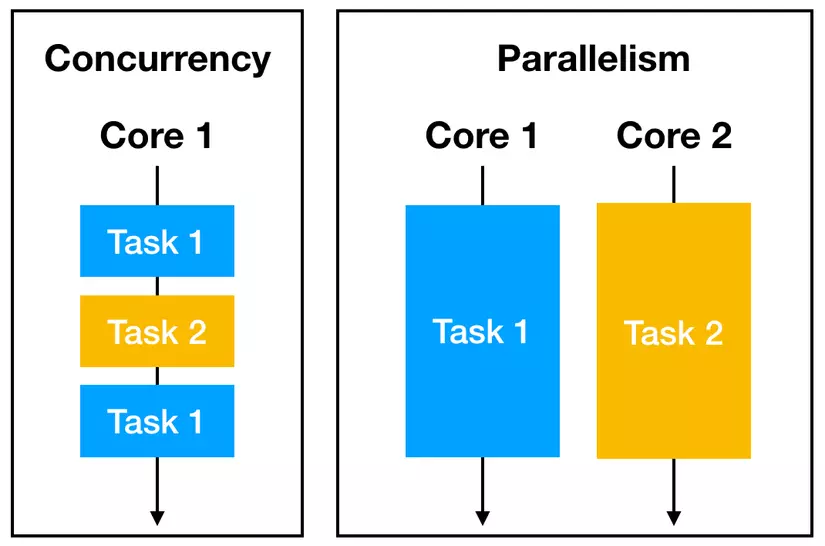
- Concurrency refers to managing multiple tasks within the same period of time; those tasks do not necessarily have to execute in parallel at the same instant. Tasks may take turns executing, creating the impression that they are running concurrently (multitasking).
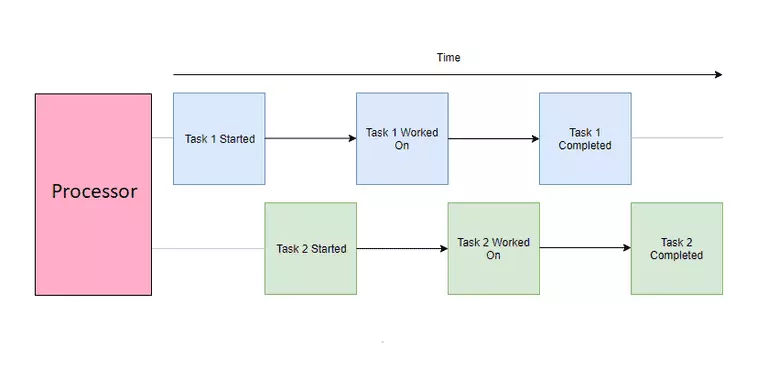
- Concurrency is typically implemented with multithreading (because of the GIL — Global Interpreter Lock, a mechanism that allows only one thread to execute at a time, which means multithreading in Python only achieves concurrent execution of threads) and asynchronous programming. It allows a program to handle many tasks by switching among them, making progress on each task without necessarily running them all at the same time.
Parallelism
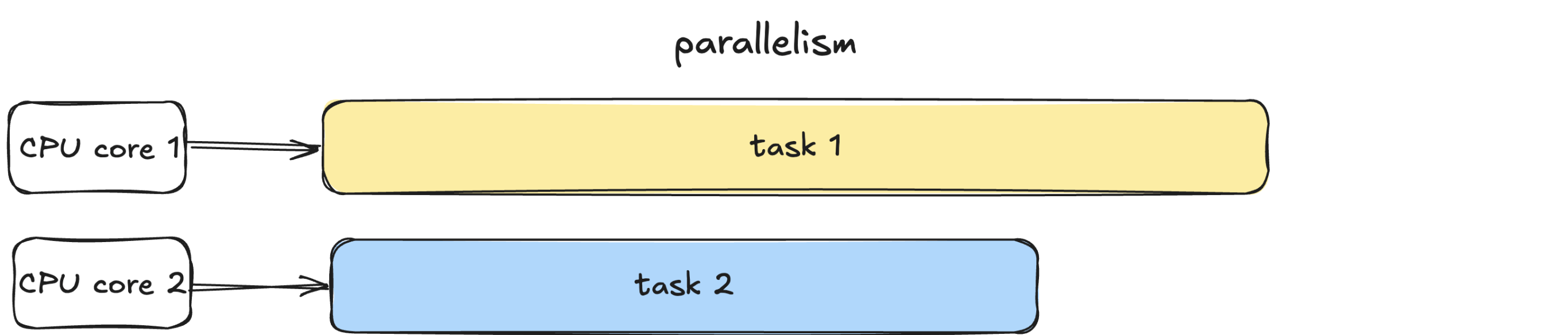
- Parallel processing, or parallel computing, is the ability to perform multiple tasks at the same time, where executing one task does not interrupt another.
- Parallelism is typically achieved with multiprocessing, running multiple processes on different CPU cores.
Comparison
So what is the difference between these two concepts? In concurrency, tasks only need to overlap in when they start and finish; the work of those tasks does not have to execute at the same instant. In parallelism, it does. In other words, concurrency is a subset of parallelism. Concurrency can be performed on a single CPU core of a processor; in that case, the CPU time-slices among tasks, running one task and then another according to a given scheduling mechanism. Parallelism, by contrast, requires a processor with multiple CPU cores, so that each task can execute on an independent CPU.
Programs
A program is simply a static file, for example a Python script or an executable file.
- A program sits on disk in a passive state and does nothing until the operating system (OS) loads it into memory to run. When that happens, the program becomes a process.
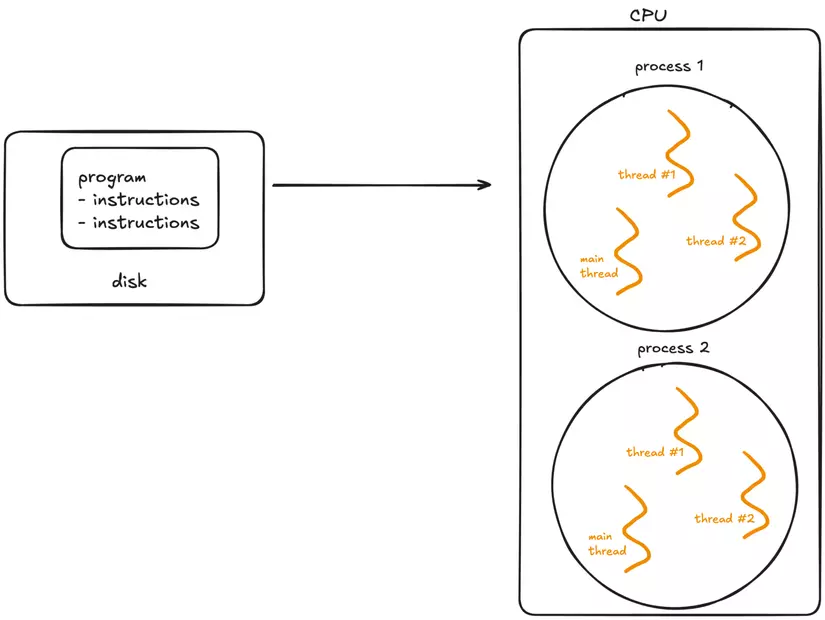
Inside a process, multiple threads can be created to execute different pieces of work in parallel, taking advantage of the operating system's multitasking capabilities.
Process
A process is an independent instance of a running program.
- Each process has its own memory space, its own resources, and its own execution state. Processes are isolated from one another, meaning one process cannot interfere with another except through mechanisms such as inter-process communication (IPC), which are specifically designed to allow that.
- Processes are typically divided into two main kinds:
- I/O-bound processes: Spend most of their time waiting for input/output operations to complete, such as file access, network communication, or waiting for user input. While waiting, the CPU is almost idle.
- CPU-bound processes: Spend most of their time performing computation (for example, video encoding or numerical analysis). These tasks demand a great deal of CPU time.
- Lifecycle of a process:
- A process starts in the new state when it is created.
- It then moves to the ready state, waiting to be granted CPU time.
- If the process must wait for an event (for example I/O), it moves to the waiting state.
- Finally, it terminates after completing its work.
Thread
A thread is the smallest unit of execution inside a process. A process acts as a “container” that holds threads, and throughout the process's lifetime many threads can be created and destroyed.
- Every process has at least one thread — called the main thread — but it can also create additional worker threads.
- Threads share memory and resources within the same process, which makes exchanging data among them very efficient. However, that sharing can lead to synchronization problems such as race conditions or deadlocks if it is not managed carefully. Unlike processes, multiple threads in the same process are not isolated from one another — a failure in just one thread can crash the entire process.
How the operating system manages threads and processes
- At any given moment, a CPU can execute only one task per core. To handle many tasks, the operating system uses preemptive context switching.
Why does the operating system have to use preemptive context switching?
- The answer
To ensure every process receives CPU time (fairness)
Without preemption, a process could occupy the CPU forever (for example, an infinite loop).
→ Other processes would never run → the system would appear “hung” even though nothing is actually broken.
while (1) {
    // the program you wrote never yields the CPU
}
If the OS does not forcibly reclaim the CPU → game over.
➡ Preemption lets the OS take the CPU back periodically (time slice) so it can be shared with other processes.
To keep the system responsive (interactivity)
The operating system must respond to:
- keyboard input
- mouse clicks
- application requests
- background system tasks
Without preemption, a heavy application (e.g., video rendering, AI training, a large loop) would freeze the entire system because it would never yield the CPU on its own.
⇒ Preemptive switching allows the OS to interrupt any process in order to prioritize important events.
To handle high-priority processes in time (priority scheduling)
Some processes always need to run immediately:
- Interrupt handlers (hardware interrupt handling)
- System processes (kernel)
- Real-time tasks
- Audio/video handlers
- Watchdog, security…
If the OS cannot preempt the CPU, a low-priority process that is currently running will cause important work to miss its deadline. ⇒ Preemption allows an important process to run IMMEDIATELY, regardless of who currently occupies the CPU.
To avoid CPU deadlock and increase system stability
If the OS relies only on processes voluntarily yielding the CPU (non-preemptive), then:
- programming bugs
- loops
- CPU-bound tasks
- uncontrolled user-space programs
→ can all “lock” the CPU.
Preemption makes the system safer, preventing a faulty process from bringing down the entire OS.
To support true multitasking
The human eye sees everything running “in parallel,” because the OS switches among processes extremely quickly (every 1–10ms).
Without preemption → a computer would run only one program at a time → it would be impossible to:
- listen to music while using Word
- write code while running a browser
- run background programs (sync, update, antivirus)
- run UI applications smoothly
➡ Preemptive context switching helps simulate time-sharing multitasking.
- During a context switch, the OS pauses the current task, saves its state, and loads the state of the next task so it can execute. This extremely fast switching creates the illusion that tasks are executing concurrently on a single CPU core.
- For processes, context switching is more expensive because the operating system must save and load distinct memory spaces.
- For threads, context switching is faster because threads share the same memory region within a process. However, switching too frequently also incurs overhead, which can reduce overall performance.
- Only when the system has multiple CPU cores can processes actually run in parallel at the same time. Each core can concurrently handle a separate process.
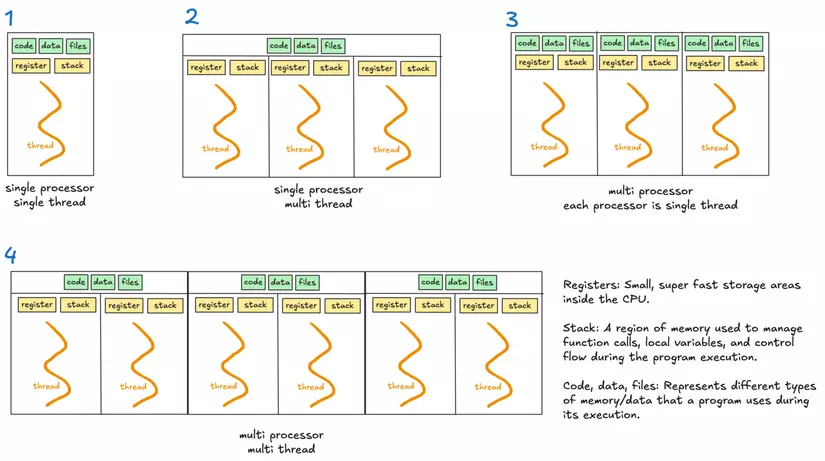
The illustration above compares four scenarios:
(1) single process, single thread – one process with one thread;
(2) single process, multiple threads – one process with many threads;
(3) multiple processes, single thread – many processes, each with one thread;
(4) multiple processes, multiple threads – many processes, each with many threads.
(The code, data, and files boxes represent the memory regions / data stores a program uses while executing; registers are the small, high-speed storage units in the CPU; the stack is the stack memory region used to manage function calls, local variables, and so on.)
Multithreading
- Multithreading is a programming technique that allows a program to perform multiple tasks concurrently within the same process. In Python, multithreading is used to improve the performance of I/O-bound applications, where tasks are slow because they wait on I/O such as reading/writing files, querying a database, or making network connections.
- Global Interpreter Lock (GIL): The GIL is a global lock in Python that ensures only one thread executes Python bytecode at a time. The GIL was introduced to simplify memory management in Python, because many internal operations (for example, object creation) are not thread-safe by default. Without the GIL, multiple threads accessing shared resources would need complex locking or synchronization mechanisms to prevent race conditions and data corruption. This means:
- Multithreading is ineffective for CPU-bound work: Because the GIL prevents threads from executing concurrently on a CPU core ⇒ the GIL becomes a bottleneck (many threads competing for the GIL must take turns executing Python bytecode)
- Multithreading is useful for I/O-bound work: While one thread waits on I/O, the GIL can be yielded to another thread.
- Because of the GIL, threads in Python are executed in rotation by the CPU according to a given strategy, for example running one thread for a time interval Δτ and then switching to another thread, alternating back and forth.
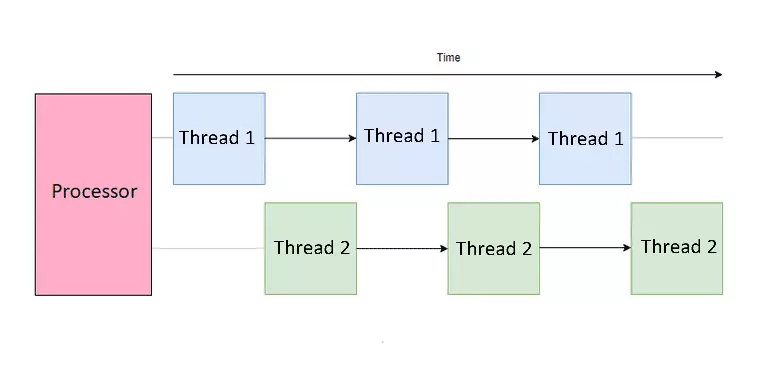
One interesting case worth noting is when using the function time.sleep — Python actually treats it as an I/O operation. The function time.sleep does not consume CPU because during the “sleep” interval it performs no computation and runs no Python bytecode. Instead, tracking the wait time is delegated to the operating system. While the thread is “sleeping,” the GIL is released, allowing other threads to run and use the Python interpreter.
Threads and Processes
- Process: A running instance of a program, with its own memory space and resources.
- Thread: A smaller unit of execution within a process. Threads in the same process share the same memory space and resources.
Comparison:
- Multiprocessing: Each process has its own GIL, does not share memory, is safer, but consumes more resources.
- Multithreading: Shares memory, is lighter-weight, but requires synchronization management to avoid data conflicts.
Multiprocessing
- Multiprocessing allows the system to run many processes in parallel, each with independent memory, GIL, and resources. Inside each of those processes, there may be one or more threads.
- Multiprocessing helps overcome the limitations of the GIL. That makes it especially suitable for CPU-bound tasks that demand a lot of computational resources.
- However, multiprocessing also consumes more resources because each process has its own memory space and incurs process-management overhead.
Asynchronous
Asynchronous programming is a technique that allows many tasks to be handled at once without waiting for each task to finish before moving on to the next. In Python, asynchrony has become an important part of the language, especially with the introduction of the asyncio module in Python 3.4 and the async and await keywords in Python 3.5.
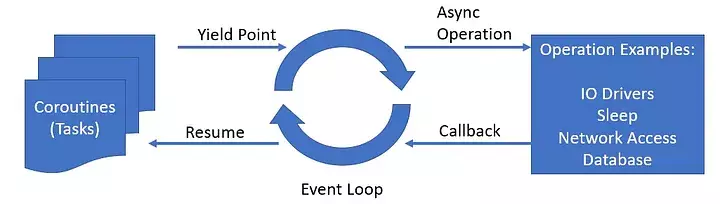
How it works Asyncio runs an event loop to coordinate the execution of tasks. Tasks voluntarily “pause” when they need to wait for something, for example a network response or reading/processing a file. While one task is waiting, the event loop switches to running another task, ensuring there is no idle time caused by waiting.
⇒ This makes asyncio especially suitable for scenarios with many small tasks that wait a lot, such as handling thousands of web requests or managing database queries. Because everything runs on a single thread, asyncio avoids the overhead and complexity of constantly switching threads.
- The difference between Asynchronous and Multithreading:
- Multithreading relies on the operating system to switch among threads when a thread is waiting (preemptive context switching). When one thread is waiting, the OS automatically switches to another thread.
- Asyncio runs on a single thread and relies on cooperation among tasks — they “yield” (pause) themselves when they need to wait (cooperative multitasking).
1. Why Do We Need Asynchronous Programming?
- Higher performance: Asynchrony allows a program to handle many I/O tasks at the same time, improving overall performance.
- Faster responsiveness: In web applications, asynchrony helps handle many client requests concurrently without causing delay.
- Efficient resource use: Saves system resources by avoiding the creation of many threads or processes.
2. The Difference Between Synchronous and Asynchronous
- Synchronous: Each task is performed sequentially. The program waits for one task to finish before moving on to the next.
- Asynchronous: Allows switching to another task while waiting for the previous one to finish, typically applied to I/O tasks.
- Asyncio Module
asyncio is a Python library that provides support for asynchronous programming using coroutines. Introduced in Python 3.4, asyncio helps you write asynchronous code easily and efficiently.
Below are some of the components of asyncio:
3.1. Coroutines
A Coroutine is a function that can pause its own execution and return control to the event loop, so the event loop can execute other coroutines. In Python, a coroutine is defined using the async def keyword. Use await to pause the current coroutine until the expression after await completes.
Coroutines do not run automatically when they are called. They need to be run by the event loop via await, asyncio.run(), asyncio.gather(), or by being converted into a task.
3.2. Tasks
A task is an object that wraps a coroutine and schedules it to run in the event loop. It allows multiple coroutines to run concurrently in the same event loop by switching context at await points.
How to create and run Tasks:
task = asyncio.create_task(my_coroutine())
When a Task is created, it is added to the event loop and will start executing when the event loop runs. You can also use functions such as asyncio.gather() to run many tasks concurrently and wait for their results.
3.4. Futures
A Future is an object that represents a result that will be available in the future. In asyncio, a Future is typically used to represent the result of asynchronous operations that have not yet completed.
How to use a Future:
- Create a Future: Typically, Futures are created and managed by the event loop and low-level APIs.
- Await a Future: You can await a Future to wait for its result.
- Complete a Future: A Future can be completed by calling set_result() or set_exception().
future = loop.create_future()

# Complete the Future somewhere in the code
future.set_result('Result')

# Wait for the Future's result
result = await future
3.3. Event Loop
The Event Loop is the heart of asyncio. It is an infinite loop responsible for managing and coordinating the execution of coroutines, managing I/O, and handling scheduled events.
How the Event Loop works:
- Start and manage: When you launch an
asyncioprogram, theevent loopis created (or the currentevent loopis obtained) and starts running. - Coordinate
CoroutinesandTasks: The event loop manages the list ofcoroutinesandtasksthat need to be executed. - Handle asynchronous I/O: It waits for I/O events or timers to occur and triggers the corresponding callbacks.
- Context switching: When a
coroutinepauses at anawaitpoint, theevent loopswitches to executing another waitingcoroutine, ensuring efficient use of CPU time.
2 Ways to Write Asynchronous Code
await coroutine
- Meaning:
- Run the coroutine and WAIT for it to complete.
- Do not switch to other work until it is done.
- Characteristics
- Sequential
- The async flow is blocked at the
awaitpoint - The coroutine's result is the return value of
await
result = await foo() #2s
# → Only after foo() finishes does the next line run.
asyncio.create_task(coroutine)
- Meaning
- Create a task that runs the coroutine concurrently.
- Do not wait for the coroutine to finish → continue immediately.
- Characteristics
- Runs in the background (background task)
- The task is managed by the scheduler and runs concurrently with other coroutines
- To get the result you must
awaitthe task later
task = asyncio.create_task(foo())
# continue other work immediately
...
result = await task  # wait for the result if needed

tasks = [
    asyncio.create_task(foo()), #2s
    asyncio.create_task(foo()), #2s
    asyncio.create_task(foo()), #2s
] # run the coroutines concurrently

results = await asyncio.gather(*tasks) #Total 2s
| Characteristic | await coroutine | create_task(coroutine) |
|---|---|---|
| Starts running the coroutine | ✔ | ✔ |
| Waits for the coroutine to complete? | ✔ Mandatory | ❌ Does not wait |
| Runs coroutines concurrently? | ❌ No | ✔ Yes |
| Execution style | Sequential | Concurrent |
| Scheduler manages the task? | ❌ Not a Task | ✔ Is a Task |
| Returns | Coroutine result | A Task object |
| When to use | You need the result from that coroutine. | |
| The work is sequential in nature. | ||
| Execution order matters. | You want to run coroutines concurrently, without blocking the async flow. | |
| Run a background job. | ||
| Run many coroutines at the same time. |
Other important points
You can combine synchronous and asynchronous code in the same program. Because synchronous code will block the program, you can move it onto a separate thread with asyncio.to_thread(). This approach makes your program truly multithreaded. In the example below, the asyncio event loop runs on the main thread, while a separate background thread is used to execute sync_task (a hypothetical synchronous function):
import asyncio
import time

def sync_task():
    time.sleep(2)
    return "Completed"

async def main():
    result = await asyncio.to_thread(sync_task)
    print(result)

asyncio.run(main())
You should also move CPU-bound (CPU-intensive) work onto a separate process.
When should you use which concurrency model?
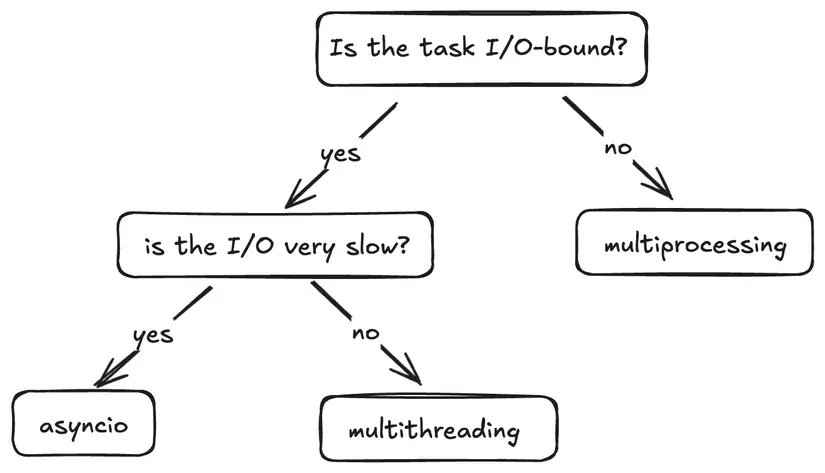
If a task is not I/O-bound (that is, not limited by I/O), use multiprocessing. If the task is I/O-bound, consider the I/O speed: if I/O is very slow, use Asyncio; if it is not too slow, use multithreading.
- Multiprocessing:
- Best suited for CPU-bound tasks that require a lot of computation.
- When you need to get around the GIL — each process has its own Python interpreter, allowing true multi-core parallelism.
- Multithreading:
- Optimal for fast I/O-bound tasks because of the lower context-switch frequency; the Python interpreter tends to stay on one thread longer.
- Not ideal for CPU-bound tasks because of the GIL's impact.
- Asyncio:
- Ideal for slow I/O-bound tasks (for example long-running network requests or slow database queries) because it manages wait time very efficiently, giving the program good scalability.
- Not suitable for CPU-bound tasks unless the work is moved onto another process.

Written by Huỳnh Phước Nguyên
AI Engineer, BK Hightech