
I. INTRODUCTION:
1. Edge Computing
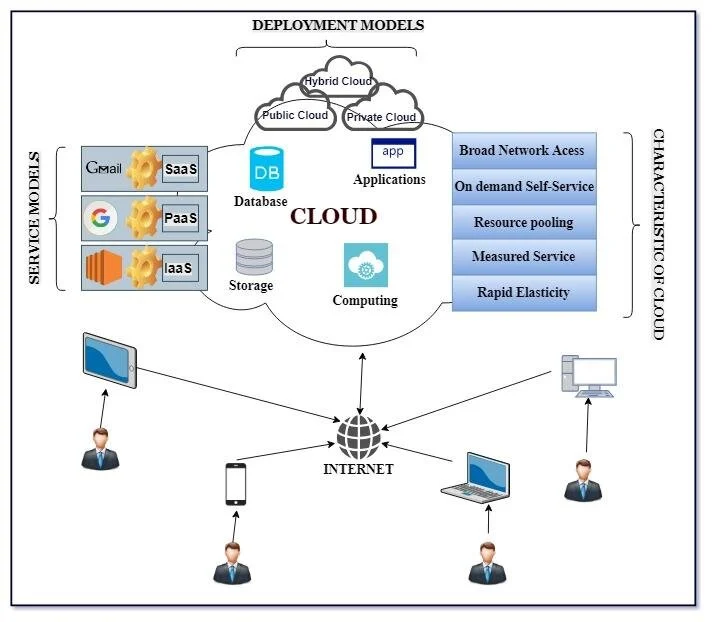
Edge computing is a distributed information technology architecture in which computation and data storage are moved from centralized data centers (Cloud/Data Centers) to the network nodes closest to where the data is generated. Typical devices in this model include local gateways, industrial computers, and data-collection devices (IoT). The essence of this structure is to minimize the distance over which information is transmitted, thereby optimizing the performance of the network system.
2. Edge Artificial Intelligence (Edge AI)
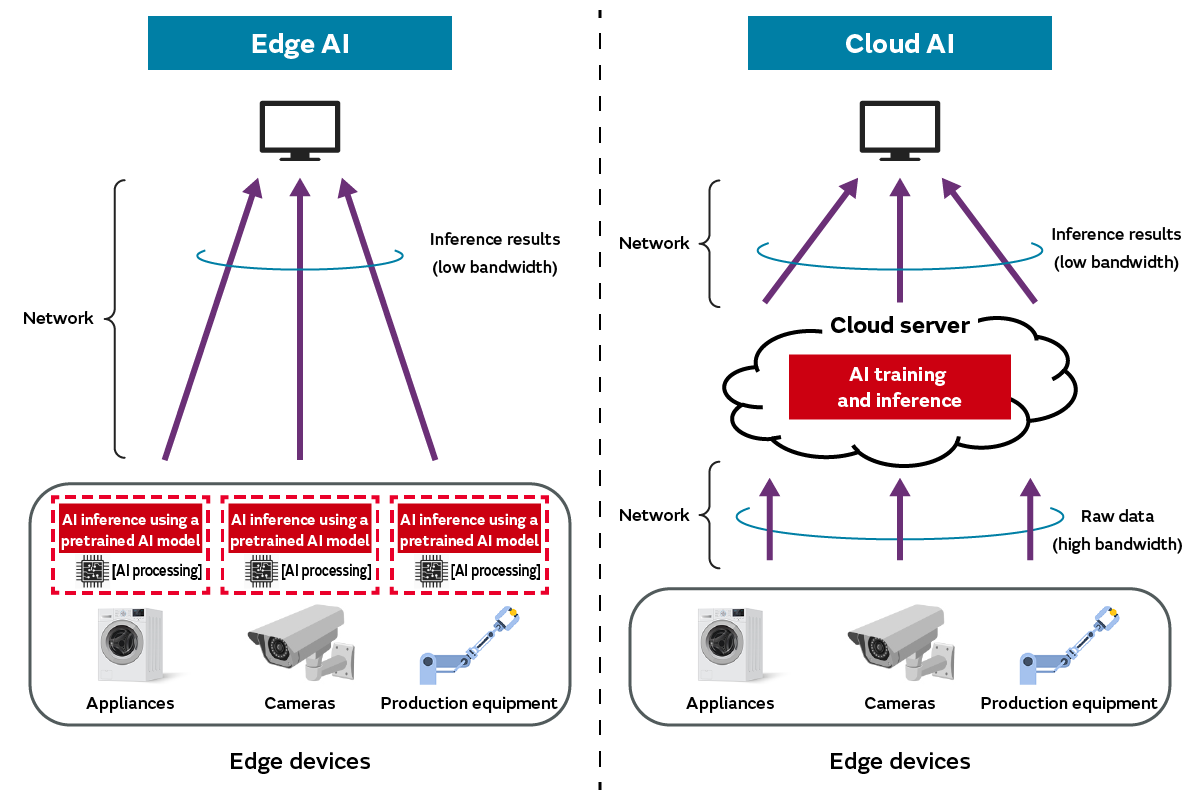
Edge AI is the integration and direct deployment of Machine Learning or Deep Learning models onto edge devices. The core characteristic of Edge AI is the ability to run inference “on-device,” processing raw data and producing analysis results without forwarding that volume of data to a cloud server.
II. CLOUD ARTIFICIAL INTELLIGENCE AND EDGE ARTIFICIAL INTELLIGENCE
| Criterion | Cloud computing (Cloud AI) | Edge computing (Edge AI) |
|---|---|---|
| Processing location | Large-scale centralized data centers | Directly on the device’s local hardware |
| Compute capacity | Superior, with flexible system scalability | Constrained by the processor’s technical specifications |
| Latency | Significant (depends on network round-trip time) | Minimal (real-time / near-instant response) |
| Connectivity requirements | Requires high bandwidth and continuous Internet connectivity | Can operate independently (offline) |
| Security and privacy | Sensitive data must travel over telecommunications networks | Data is processed and stored locally, with a high level of security |
III. IMPORTANCE AND APPLICATION BENEFITS
Adopting an Edge AI architecture delivers four core groups of benefits:
- Optimized response time (reduced latency): On-device inference provides latency measured in milliseconds. This is a decisive factor in systems that require real-time reactions and involve high risk, such as emergency braking on autonomous vehicles or automated medical intervention systems.
- Bandwidth efficiency and transmission cost savings: Instead of sending raw data streams (such as high-resolution video) to a central server, Edge AI extracts and transmits only metadata or low-volume alerts. This significantly reduces pressure on network infrastructure and cloud storage costs.
- Availability and offline operation: Edge AI systems are highly independent, allowing devices to continue analysis and decision-making even when connectivity is lost or the network signal degrades, ensuring continuity of the system.
- Improved data security and privacy: Through local processing, sensitive information (such as biometric data, medical records, and personally identifiable information) never leaves the physical device, thereby substantially reducing the risk of interception or leakage in transit.
IV. OVERALL EDGE AI SYSTEM ARCHITECTURE
A complete Edge AI ecosystem requires the convergence and compatibility of three primary architectural layers:
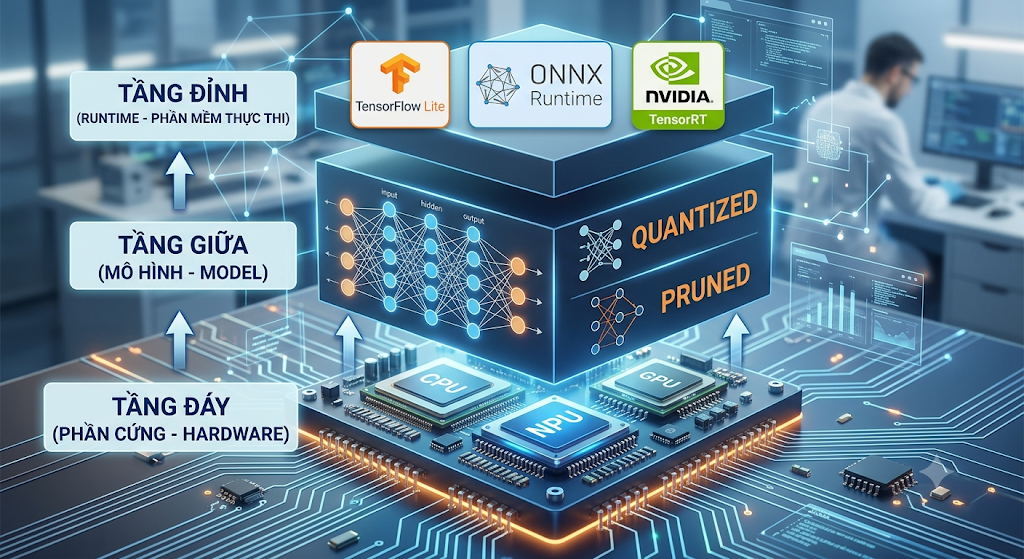
- Hardware Layer: Includes low-power microprocessors and microcontrollers, combined with dedicated AI hardware accelerators such as NPUs (Neural Processing Units) or edge TPUs to handle complex matrix computations.
- Model Layer: Original algorithm models must go through an optimization process. Techniques such as neural-network pruning, quantization, and knowledge distillation are applied to reduce the model’s size and RAM consumption so that it fits the constrained resources of edge devices.
- Runtime Layer: A collection of libraries and frameworks that compile the model’s computational graph into instruction sets optimized for each specific type of hardware (for example: TensorFlow Lite, ONNX Runtime, TensorRT).
V. PRACTICAL APPLICATION SCENARIOS
1. Intelligent Security Monitoring:
Deploy computer-vision algorithms on IP camera devices to detect motion, recognize faces, and raise intrusion alerts at the edge without requiring an intermediate analysis server.

2. Digital Health and Wearables:
Integrate AI into health-monitoring devices to continuously analyze vital signs (such as ECG), thereby detecting abnormal heart-rhythm indicators in real time.

3. Industry 4.0 (Smart Factory):
Use data from IoT sensor systems to run predictive maintenance models. Edge AI analyzes variations in vibration and temperature to warn of mechanical failure risks before an incident actually occurs.
VI. CHALLENGES AND BARRIERS IN REAL-WORLD DEPLOYMENT
The transition from a research environment to industrial-scale (production) deployment faces several technical barriers:
- Strict physical resource constraints: Edge systems are tightly bound by energy budgets (battery), storage space, and CPU/NPU processing cycles. Optimizing large models to run in this environment requires highly sophisticated data-compression techniques.
- Physical security vulnerabilities: Edge devices are often installed at geographically distributed locations that lack the strict physical protection of a data center. This opens the risk of direct hardware tampering to extract data, steal AI models, or carry out side-channel attacks.
- Scalability and system-governance challenges: Maintaining synchronization, rolling out security patches, and performing OTA (Over-The-Air) model updates for a network of thousands or millions of distributed devices is a complex operational problem, especially when service interruption is not allowed.
VII. HANDS-ON LAB
1. Lab objectives
- Understand the process of installing an operating system (OS) onto an embedded board and an emulation environment.
- Become familiar with the command-line interface (CLI).
- Successfully compile and execute a “Hello World” program in C/C++.
2. Installing an operating system on an embedded computer
Installing an operating system on an embedded computer (SBC) typically includes these common steps: download the operating system image file (Image), flash it onto a memory card / flash memory using dedicated software (such as BalenaEtcher or Raspberry Pi Imager), then insert the card into the board and boot.
You can refer to detailed guides for each device type via the following links:
- Raspberry Pi: Guide to installing an operating system on Raspberry Pi
- NVIDIA Jetson Nano: Guide to installing Ubuntu 20.04 on Jetson Nano
3. Setting up an emulation environment
If you do not have actual hardware, you can use emulation tools to practice:
- QEMU: A powerful open-source emulator that can emulate ARM architecture (Raspberry Pi) or ARM64 (Jetson Nano) on an X86 computer.
- General process: Install QEMU -> Download a suitable Kernel and Image file -> Run the command to initialize the emulated hardware.
4. First Hello World program
After booting into the operating system (Linux) on both the real machine and the emulator, open a terminal and follow these steps to run the program.
Step 0: Install the Python environment
sudo apt update && sudo apt install python3 -y
Step 1: Create the source file
Use a text editor to create the file:
nano helloworld.py
Step 2: Write the source code
Copy the following code into the file:
print("Hello World!")
Press Ctrl + O, then Enter to save. Press Ctrl + X to exit.
Step 3: Run the program
Execute the compiled file:
python3 helloworld.py
Output displayed on the screen:
Hello World!

Written by Huỳnh Phước Nguyên
AI Engineer, BK Hightech